
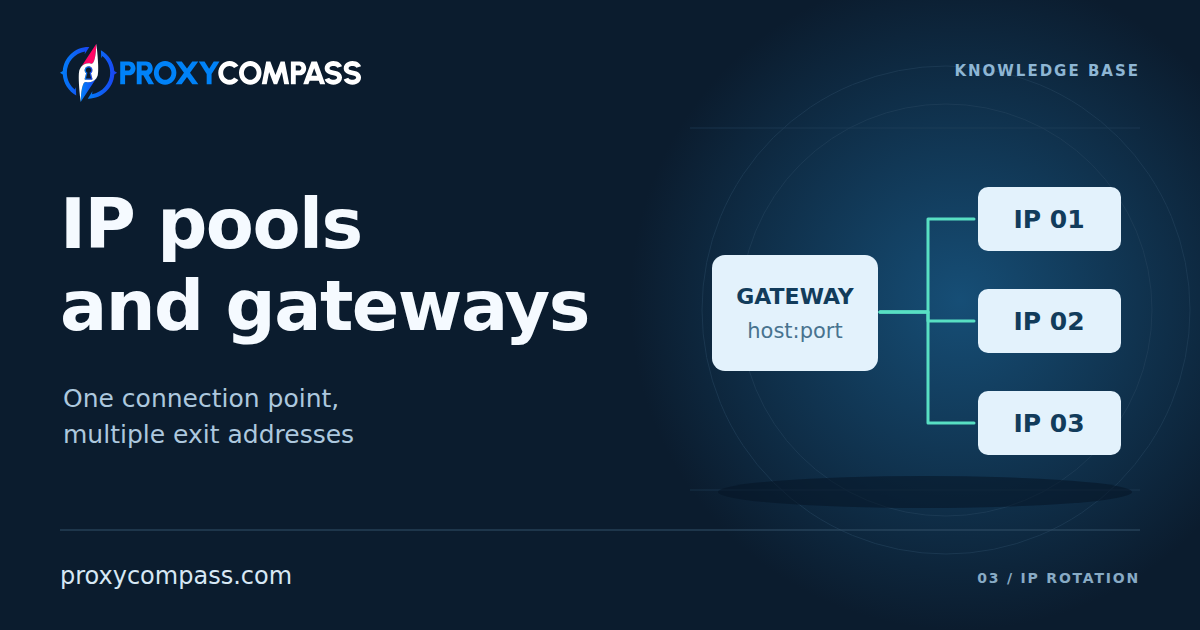
IP Pools & Gateway Endpoints
A proxy service can give you one connection address and access to many public IPs. The address entered in your software is the gateway endpoint; the addresses the service can use to reach websites form its IP pool. The website sees the exit IP selected for its connection, which can differ from the gateway address.
The choice between keeping an address and changing it is explained in Static vs Rotating Proxies. Here, we separate the gateway in your settings, the exits your account can use and the addresses available when you need them.
What happens behind a gateway
A pool contains usable ways to reach the internet through different public addresses. For a datacenter service, those exits may be configured on servers. For a residential network, traffic may leave through participating household connections. A mobile pool uses cellular connections. A stored list of IP numbers alone cannot forward a request: the service needs working equipment and a network route through the chosen exit.
The gateway gives your application a common entrance to that infrastructure. A request typically passes through these stages:
- Your software connects to the gateway using a supported proxy protocol and presents the required access details.
- The service checks the account and determines which pool or assigned group of addresses it can use.
- It applies the relevant routing settings and selects an available exit, or uses an existing assignment.
- The exit establishes the connection to the destination. The response travels back through the proxy service to your application.
For example, your software might connect to gateway.example:8000 while the website receives traffic from 192.0.2.14. A later connection through the same endpoint could leave through 198.51.100.27. These are illustrative addresses. Your software has kept the same entry point; the service has changed the exit behind it.

The gateway lets the service manage its exits without giving your application a separate connection record for every IP. Looking up the gateway hostname in DNS shows how to reach that entrance. To check the exit actually used, inspect the source address received by the destination or an IP-checking service through the proxy.
What the gateway host and port mean
A connection endpoint consists of a host and a port. The host is a domain name or IP address; the port identifies the service accepting the connection. Your software also needs the proxy protocol and the access method required by the provider. Routing instructions may be passed in the username, selected by a port or set in the account dashboard.
A list of proxy connection records can therefore describe several different arrangements:
| Access arrangement | How the exit is selected |
|---|---|
| Direct proxy addresses | Your application chooses which listed proxy address to connect to. |
| Gateway ports assigned to exits | The service maps each supplied port to an assigned exit. Your application selects the corresponding port. |
| Gateway access to a pool | Your application supplies the connection settings; the service selects an exit from the eligible pool. |
A gateway can serve fixed assignments as well as rotating access. With an assigned port, the connection record may stay the same after the service replaces the exit behind it. With pool access, many generated records can lead into the same selection of IPs.
Port numbers do not have a universal meaning across proxy services. A different port might select another protocol, a different routing rule, or a particular assigned exit. Generating a longer endpoint list does not by itself allocate more IPs. What matters is the mapping the service maintains behind those records.
Which part of the pool can your request use?
A provider's entire network is not necessarily the selection offered to each customer. Access can be divided by product, network type, account, or an allocated group of IPs. Two customers using the same hostname can be routed through different sets of exits because their accounts have different access.
Where targeting is supported, additional conditions can narrow the selection. A request for one country may allow more exits than a request for that country, a particular city and a particular internet provider together. A filter selects from existing addresses; it does not create matching exits.
Availability then changes the choice again. Some exits may be offline, temporarily unavailable, or unable to carry another connection. A country or city being present in a selection menu does not establish that suitable exits will be available there at every moment. When none match, the service may return an error or apply a documented fallback. For a location-specific task, a fallback to another country changes the meaning of the result.

A sticky session affects this selection by asking the service to continue using an assigned exit. It does not enlarge the pool. The pool describes the possible addresses; session and rotation rules determine how the service uses them over time.
The gateway's country and the exit's country
The gateway and the exit can be in different countries. An application in Germany could connect to a gateway in the Netherlands and use an exit in Japan, if the service supports that route. The website receives the connection from the exit IP. In this example, it identifies that IP as Japanese; the diagram is about entry and exit addresses, not a geolocation error.

Regional gateways can give an application a shorter or better route into the service. The remaining route still includes the exit's connection and the destination website. A nearby entry server alone does not determine the response time of the whole request.
Several gateway hostnames can also provide access to overlapping pools. Switching the entry address does not necessarily create a separate supply of exits. Session handling can differ between entry servers as well, so an existing assignment may not follow a connection to another gateway.
What does the size of an IP pool mean?
A pool total is useful only when you know what was counted. These measurements answer different questions:
| Measurement | What it describes |
|---|---|
| IPs configured in the service | Addresses configured for the service. Some may be reserved, unavailable or outside your account’s allocation. |
| Distinct IPs seen over a period | Different addresses recorded during a day, month, or another stated period. They need not all have been online together. |
| Exits available to your account now | Addresses currently usable with your product, access rights, and selection settings. |
Managed datacenter and server-hosted ISP pools can have a relatively stable inventory. Even there, the capacity of an address range, the number of configured proxies, and the number included in your package can differ. An address held in reserve contributes no usable exit until the service makes it available.
In residential pools built from participating household connections, devices join and leave, while internet providers can change the public IP assigned to a connection. A monthly count can keep growing as new addresses appear even when the number of devices online at the same time has not grown.
Mobile access adds another distinction. The proxy service may operate modems and SIM cards, or obtain access through distributed devices using mobile data. The carrier assigns their public addresses. One device can use different IPs over time, and several devices can share a public IP through carrier-grade NAT, or CGNAT. The number of modems or phones therefore cannot be read as a count of unique public IPs.
For a particular job, the relevant scale is the selection reachable under its conditions and during its working hours. A large worldwide total says little about how many suitable addresses are available in one city or through one carrier.
Why the same IP can appear again
A pool is not necessarily a queue that hands out every address once before starting again. The service may choose randomly, keep an existing assignment, or prefer exits that are currently available and suitable for the route. An IP can therefore return before your application has used all the other addresses.
Repeated addresses can have several causes. A session may be preserving its assigned exit. The current filters may leave only a small selection. Some members of the pool may be offline. The service's selection policy may also favour particular exits. The repetition pattern describes what your account received under those conditions; it is not a direct count of the entire network.

For a useful test, record the exit IP, time, location filters and session mode. Open new destination connections and allow a fresh selection, rather than keeping one sticky assignment. For example, 100 connections returning 40 distinct IPs establish that you received those 40 addresses during the test. They do not establish that the provider has only 40 IPs or that the next 100 connections will return the same number.
What makes a pool useful for your work?
Distinct addresses do not always provide distinct network coverage. Many IPs can belong to one address range or one operator. If a task needs results from several internet providers, distribution across those networks matters. An autonomous system number, or ASN, helps identify the routing network an address belongs to; it adds information that a simple IP count does not provide.
Usage is uneven too. Exits in a popular location may receive much more traffic than addresses elsewhere in the same pool. In a shared service, other customers can also use an exit, concurrently or at different times. If a website applies limits to a source IP, that address's recent activity can affect your requests. A large supply in other locations does not remove pressure from the particular group your task uses.
IP availability also differs from processing capacity. One exit can carry several connections, while an account with access to many exits can still have limits on simultaneous connections, request rate, or traffic volume. More gateway records do not increase those allowances. A useful assessment considers address selection and the amount of work the service can carry separately.
When a request fails, identify the stage. An access error at the gateway calls for checking authentication. A “no matching exit” response calls for checking filters and availability. A refusal from the destination calls for examining its response and the request. A larger pool may help with a shortage of suitable exits; it does not fix incorrect credentials or remove an account limit imposed by the website.